

Description
Download UnShare – Google Drive File Expiry Automation Tools
Overview
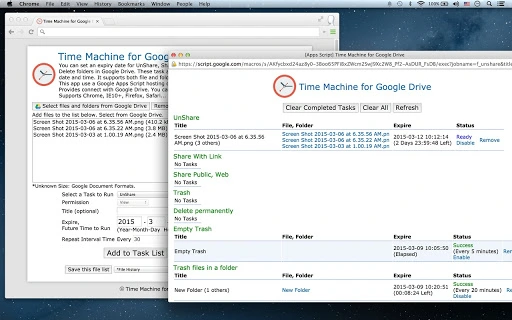
UnShare is a productivity-focused desktop application designed to enhance file and folder management within Google Drive. The software enables users to set automatic expiration dates for key actions such as file sharing, public sharing, trash operations, and deletions. This functionality ensures that shared content does not remain accessible indefinitely, improving data security and compliance with retention policies. The tool is particularly useful for professionals managing sensitive documents, teams collaborating on time-bound projects, or individuals seeking to maintain control over their digital assets.
By leveraging Google Apps Script hosted on Google Cloud, UnShare operates efficiently and reliably, offering a lightweight solution for automating routine tasks. It integrates directly with Google Drive, allowing seamless access to files and folders without requiring additional setup. The application supports multiple browsers, including Chrome, Firefox, Safari, and Internet Explorer 10 and above, making it accessible across various environments. While the developer, UnShare, did not provide additional background information, the software's focus on automation and security suggests a targeted approach to addressing common challenges in digital file management.
Key Features & Capabilities
- Automatic Expiry for Sharing Actions – Users can assign a specific date and time after which shared links (private or public) will automatically expire, preventing unauthorized access beyond the intended period.
- Expiry for Trash and Deletion Tasks – The software allows scheduling the automatic emptying of the trash or deletion of files and folders at a future date, helping users maintain a clean and organized drive.
- Support for Files and Folders – Both individual files and entire folders can be configured with expiry rules, offering flexibility in managing different types of content.
- Google Drive Integration – Direct connection to Google Drive enables real-time access and execution of tasks without requiring manual intervention.
- Cloud-Based Execution via Google Apps Script – The application runs on Google Cloud infrastructure, ensuring fast and reliable performance with minimal local resource usage.
These capabilities are ideal for users who need to enforce time-limited access to documents, such as contractors, auditors, or educators sharing temporary materials. For example, a project manager could set a 30-day expiry on a shared report, ensuring it becomes inaccessible after the project ends. Similarly, a team member can schedule a folder deletion for the end of a fiscal quarter, reducing clutter and maintaining compliance.
User Interface, Workflow & Performance
UnShare features a streamlined user interface designed for simplicity and efficiency. The core workflow begins with connecting to a Google Drive account, after which users can select files or folders and apply expiry settings through an intuitive form. Navigation is straightforward, with clear labels and logical grouping of options, minimizing the learning curve for new users.
Once configured, the software schedules the specified task to run at the designated time, relying on Google Apps Script for execution. The interface provides confirmation messages and status updates, allowing users to track pending actions. Since the application operates remotely through Google Cloud, local performance is not impacted, and the software remains responsive even during active tasks.
The developer did not specify resource usage details. Performance observations are based on general software behavior patterns. Stability is expected to be high due to the use of Google Cloud infrastructure, which is known for reliability and uptime. No reports of crashes or errors were provided, but users should ensure their internet connection remains stable to maintain uninterrupted access to scheduled tasks.
Compatibility & System Requirements
UnShare is compatible with Chrome OS, Windows, and Mac operating systems, offering broad accessibility across desktop environments. The application is delivered as a lightweight 2.3 MB file, ensuring quick installation and minimal storage impact. It runs within supported web browsers, including Chrome, Internet Explorer 10 and above, Firefox, and Safari, eliminating the need for native installation on all platforms.
Exact system requirements were not listed. The software relies on a modern web browser and an active internet connection to function. Hardware requirements are minimal, as processing is handled by Google Cloud servers. Users should verify that their browser is up to date and that they have enabled JavaScript and cookies for proper functionality. Compatibility information was partially provided.
Pros and Cons
Pros
- Automatically enforces file and folder expiry for enhanced security
- Supports both files and folders with flexible expiry rules
- Runs on Google Cloud for reliable, scalable performance
- Lightweight and browser-based with no heavy local installation
- Free to use with no hidden costs or subscriptions
Cons
- Requires continuous internet access for operation
- Dependent on Google Drive and third-party cloud services
- No offline functionality available
- Limited to browser-based use; no native desktop app for all platforms
- Exact system requirements not specified
FAQ Section
Is UnShare compatible with all Google Drive accounts?
Yes, UnShare works with any Google Drive account that has access to Google Apps Script and the necessary permissions enabled. Users must grant the required access during the initial setup.
Can I use UnShare without an internet connection?
No, the application requires a stable internet connection to communicate with Google Cloud and execute scheduled tasks. It does not support offline usage.
How secure is the data handled by UnShare?
UnShare uses Google Cloud infrastructure, which employs industry-standard security measures. All data is processed through encrypted connections, and no sensitive information is stored locally.
Does UnShare require a paid Google Workspace account?
No, the software functions with both free and paid Google accounts. However, some advanced features may be limited based on the account type.
How often does UnShare check for scheduled tasks?
UnShare relies on Google Apps Script’s scheduling system, which checks for pending tasks at regular intervals. The exact frequency is managed by Google’s backend services.
Final Thoughts + CTA
UnShare delivers a focused and effective solution for users seeking automated control over Google Drive file sharing and deletion. Its ability to set expiry dates for critical actions addresses a common gap in standard Google Drive functionality, offering a valuable layer of security and compliance. The browser-based design, combined with cloud execution, ensures accessibility and minimal system impact. While it lacks offline capabilities and depends on consistent internet access, its strengths in automation, ease of use, and cost make it a compelling choice for professionals and teams managing time-sensitive content.
For anyone who shares files regularly and wants to ensure they don’t remain accessible beyond a set period, UnShare provides a practical and secure tool. Download UnShare now to take full control of your Google Drive file lifecycle.
Guides & Tutorials for Time Machine for Google Drive App for Chrome
How to install Time Machine for Google Drive App for Chrome
- Click the Preview / Download button above.
- Once redirected, accept the terms and click Install.
- Wait for the Time Machine for Google Drive App for Chrome download to finish on your device.
How to use Time Machine for Google Drive App for Chrome
This software is primarily used for its core features described above. Open the app after installation to explore its capabilities.
User Reviews for Time Machine for Google Drive App for Chrome 0
No reviews found





